 picoZ80 Technical Guide
picoZ80 Technical Guide
This guide documents the picoZ80 hardware architecture, RP2350 PIO bus interface, memory model, JSON configuration reference, virtual device framework, and debugging procedures. It is intended for developers who want to understand the internals, write new drivers, port the firmware to a new host machine, or debug firmware-level issues.
For end-user setup and web interface usage, see the picoZ80 User Manual. For the project overview and build instructions see the picoZ80 project page.
Hardware Architecture
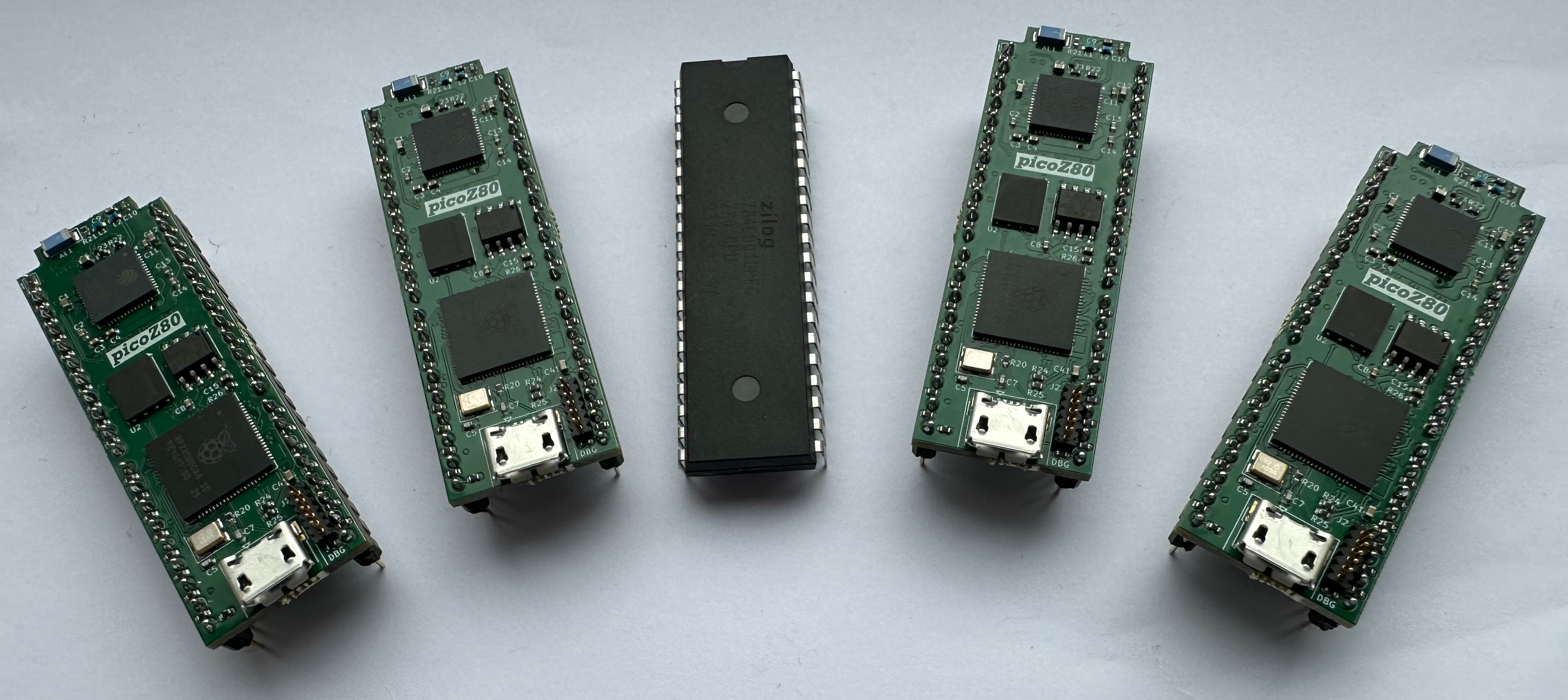
The picoZ80 integrates five subsystems on a single compact PCB designed to fit within the footprint of a DIP-40 package. All logic operates at 3.3V; the Z80 bus interface handles level translation and current drive for the 5V host bus.
System Block Diagram
┌─────────────────────────────────────────────────────────────────────────┐
│                         picoZ80 PCB                                     │
│                                                                         │
│  ┌────────────────────────────┐      ┌──────────────────────────────┐  │
│  │         RP2350B            │      │           ESP32-S3           │  │
│  │  (Cortex-M33, dual core)   │      │                              │  │
│  │                            │      │  ┌──────┐  ┌──────────────┐ │  │
│  │  Core 0: USB, file I/O,    │◄────►│  │  SD  │  │  Web Server  │ │  │
│  │          ESP32 relay       │ FSPI │  │ Card │  │  (Bootstrap) │ │  │
│  │  Core 1: Z80 bus hot loop  │ UART │  └──────┘  └──────────────┘ │  │
│  │                            │      │                              │  │
│  │  PIO 0,1,2: bus interface  │      │  WiFi ─── 802.11 b/g/n AP   │  │
│  │                            │      │           or Client mode     │  │
│  │  16MB SPI Flash            │      └──────────────────────────────┘  │
│  │  8MB PSRAM (SPI)           │                                         │
│  └────────────────────────────┘                                         │
│                │                                                         │
│       ┌────────┴────────┐                                               │
│       │ Z80 Bus Interface│                                               │
│       │ (40-pin DIP out) │                                               │
│       └────────┬────────┘                                               │
│                │ 5V bus (A0–A15, D0–D7, MREQ, IORQ, RD, WR...)         │
└────────────────┼────────────────────────────────────────────────────────┘
                 │
         ┌───────┴───────┐
         │  Host Z80     │
         │  DIP-40 socket│
         │  (legacy      │
         │   computer)   │
         └───────────────┘
Key Components
| Component | Device | Role |
|---|---|---|
| Primary MCU | RP2350B (QFN-80) | Dual Cortex-M33, 150MHz (up to 300MHz OC), 512KB SRAM, 12 PIO state machines, 48 GPIO pins |
| Flash | W25Q128 (16MB SPI) | Bootloader, dual firmware slots, config partitions |
| PSRAM | 8MB SPI PSRAM | 64 × 64KB RAM/ROM banks for Z80 address space |
| Co-processor | ESP32-S3-PICO-1 | WiFi, SD card, web server, OTA |
| USB hub | CH334F | USB hub, firmware update bridging |
| Power supply | TLV62590BV | 5V → 3.3V synchronous buck converter |
RP2350B GPIO Assignment
The RP2350B QFN-80 package provides 48 GPIO pins. The picoZ80 uses virtually every pin. The assignment is fixed in the board design and reflected in the PIO programs:
| GPIO Range | Signals | Direction |
|---|---|---|
| GPIO 0–15 | A0–A15 (Z80 Address Bus) | Output (driven by PIO) |
| GPIO 16–23 | D0–D7 (Z80 Data Bus) | Bidirectional (PIO tri-state) |
| GPIO 24 | MREQ |
Output |
| GPIO 25 | IORQ |
Output |
| GPIO 26 | RD |
Output |
| GPIO 27 | WR |
Output |
| GPIO 28 | M1 |
Output |
| GPIO 29 | RFSH |
Output |
| GPIO 30 | BUSREQ |
Input |
| GPIO 31 | BUSACK |
Output |
| GPIO 32 | HALT |
Output |
| GPIO 33 | INT |
Input |
| GPIO 34 | NMI |
Input |
| GPIO 35 | WAIT |
Output |
| GPIO 36 | CLK |
Input (host clock) |
| GPIO 37 | RESET |
Input |
| GPIO 38–41 | ESP32 FSPI (CS, CLK, MOSI, MISO) | SPI |
| GPIO 42–43 | ESP32 UART (TX, RX) | UART |
| GPIO 44–45 | PSRAM SPI | SPI |
| GPIO 46–47 | USB (D+, D–) | USB |
Firmware Architecture
The RP2350 firmware is built with the Raspberry Pi Pico SDK 2.x targeting the RP2350-arm-s platform. The firmware is divided into two independent executables: the Bootloader and the Application.
Flash Memory Layout
| Partition | Address Range | Size | Contents |
|---|---|---|---|
| Bootloader | 0x10000000 – 0x1001FFFF |
128KB | USB bridge, firmware update, partition selector |
| App Slot 1 | 0x10020000 – 0x1051FFFF |
5MB | Z80 firmware — active application (slot 1) |
| App Slot 2 | 0x10520000 – 0x10A1FFFF |
5MB | Z80 firmware — active application (slot 2) |
| App Config 1 | 0x10A20000 – 0x10C9FFFF |
2.5MB | ROM images + minified config JSON (slot 1) |
| App Config 2 | 0x10CA0000 – 0x10F1FFFF |
2.5MB | ROM images + minified config JSON (slot 2) |
| General Config | 0x10F20000 – 0x10FFEFFF |
892KB | Core settings, scratch space |
| Partition Table | 0x10FFF000 – 0x11000000 |
4KB | Active slot number, checksums, metadata |
Dual-Core Responsibilities
The two Cortex-M33 cores are assigned completely separate responsibilities and communicate via an inter-core message queue (
queue_t). This separation ensures that non-real-time work on Core 0 never introduces jitter into the Z80 bus transactions on Core 1.
| Core | Responsibilities |
|---|---|
| Core 0 | USB CDC-serial bridge; firmware update coordination; file I/O (relayed to ESP32 over UART); ESP32 command dispatch (disk image changes, config reloads, version queries); partition management; inter-core message dispatch. |
| Core 1 | Z80 bus emulation hot loop — runs exclusively. Services PIO FIFOs, resolves each bus transaction against the memory map, and dispatches to: physical host hardware (PHYSICAL), PSRAM (RAM/ROM), or virtual device handler (FUNC). Inner loop is placed in SRAM. |
PIO Bus Interface
The Z80 bus interface is implemented entirely in RP2350 PIO assembly (
z80.pio). The RP2350 provides three PIO blocks (PIO 0, PIO 1, PIO 2) each with four state machines — twelve state machines in total, of which the Z80 firmware uses all twelve.
PIO programs execute independently of the Cortex-M33 cores. The bus interface continues to respond deterministically even when Core 1 is occupied with PSRAM accesses or virtual device function calls. State machines communicate via PIO IRQ flags rather than polling, eliminating inter-machine latency.
PIO Program Table
| PIO | State Machine | Program | Function |
|---|---|---|---|
| 0 | SM 0 | z80_addr |
Outputs the 16-bit address (A0–A15) onto the bus and signals cycle start to SM 2. |
| 0 | SM 1 | z80_data |
Drives or samples D0–D7 with tri-state control; released during BUSRQ. |
| 0 | SM 2 | z80_cycle |
Top-level bus cycle sequencer — orchestrates fetch, read, write, and I/O cycles. |
| 0 | SM 3 | z80_fetch |
Opcode-fetch cycle (M1 + MREQ + RD). |
| 1 | SM 0 | z80_mem_read |
Memory read cycle (MREQ + RD). |
| 1 | SM 1 | z80_mem_write |
Memory write cycle (MREQ + WR). |
| 1 | SM 2 | z80_io_read |
I/O read cycle (IORQ + RD). |
| 1 | SM 3 | z80_io_write |
I/O write cycle (IORQ + WR). |
| 2 | SM 0 | z80_busrq |
Manages BUSREQ/BUSACK; releases /IORQ, /MREQ, /RFSH, /M1, /HALT, /WR, /RD. |
| 2 | SM 1 | z80_nmi |
Detects NMI assertion and signals Core 1. |
| 2 | SM 2 | z80_clk_sync |
Synchronises PIO state machines to the host Z80 CLK signal. |
| 2 | SM 3 | z80_int_ack |
Handles interrupt-acknowledge cycles (M1 + IORQ). |
PIO IRQ Signal Conventions
Inter-state-machine communication uses PIO IRQ flags. Core 1 monitors these flags in the hot loop to take action on each bus event:
| IRQ | Event |
|---|---|
| IRQ 0 | Address valid / cycle start — a new bus cycle has begun and A0–A15 are stable. |
| IRQ 1 | Data phase — data bus direction has been resolved; D0–D7 should be driven or sampled. |
| IRQ 2 | T1 detected — the rising edge of T1 on the current cycle. Used to synchronise internal operations to the host clock. |
| IRQ 3 | RESET event — the host RESET line has been asserted. Core 1 should reinitialise emulation state. |
| IRQ 4 | NMI detected — host NMI line asserted. |
| IRQ 6 | BUSRQ active — host has asserted BUSREQ; PIO is releasing the bus. |
Wait State Generation
The
z80_wait PIO program in PIO 2 SM 0 inserts configurable T-cycle wait states on the host bus by asserting /WAIT. The number of additional wait states is controlled per memory or I/O block by the tcycwait parameter in config.json.
Wait states are necessary when the RP2350 needs additional time to complete a PSRAM access or a virtual device function call before presenting data to the host bus. The tcycsync parameter enables T1 synchronisation (z80_sync in PIO 2 SM 1), which locks the PSRAM access window to the T1 rising edge of each bus cycle, preventing timing drift in applications that depend on the host clock for precise timing (cassette, serial bit-banging).
Memory Model
Memory accesses are resolved through three tiers of increasing latency. The three-tier design ensures that the common case (PSRAM-backed RAM/ROM) is fast while allowing maximum flexibility for virtual devices and physical host pass-through.
Tier 1 — RP2350 SRAM Dispatch Table
A 128-entry array of 32-bit
membankPtr values, resident in the RP2350's 512KB on-chip SRAM, provides an O(1) block-type lookup for every bus transaction. One entry covers each 512-byte block of the 64KB Z80 address space (128 × 512 = 65,536 bytes). Each entry encodes:
- The block type (PHYSICAL, RAM, ROM, FUNC, etc.).
- For PSRAM-backed blocks: the PSRAM bank number and offset.
- For FUNC blocks: an index into the virtual device function pointer table.
Tier 2 — External PSRAM
The 8MB PSRAM is organised as:
- 64 banks × 64KB — RAM or ROM image data for the Z80 address space.
- 64KB
memPtr— per-byte redirect pointer array for PTR-type blocks. - 64KB
memioPtr— function pointer array for memory-mapped FUNC devices. - 64KB
ioPtr— function pointer array for I/O port FUNC devices.
Tier 3 — 16MB SPI Flash
ROM images are loaded from Flash (or the SD card, via the ESP32) into PSRAM at boot. At runtime the Flash is not accessed for bus transactions — all ROM data is served from PSRAM. The Flash is used for:
- Bootloader and application firmware.
- Minified
config.json(cached from SD card on each boot). - ROM images in App Config partitions (used when no SD card is present).
Memory Block Types
| Type | Description |
|---|---|
PHYSICAL |
Pass-through — the RP2350 releases the bus and the physical host memory responds. Used for the host’s native ROM and RAM. |
PHYSICAL_VRAM |
As PHYSICAL but with additional wait states for host video RAM timing. Suitable for MZ-700/MZ-80A VRAM regions. |
PHYSICAL_HW |
Pass-through for host hardware registers (I/O-mapped devices in memory space). |
RAM |
Read/write — backed by a PSRAM bank. The RP2350 services reads and writes from/to PSRAM. |
ROM |
Read-only — backed by a PSRAM bank. Write cycles are silently ignored (the host sees normal bus timing but no data is stored). |
VRAM |
PSRAM-backed video RAM. Write cycles are mirrored to both PSRAM and the physical host VRAM simultaneously. |
FUNC |
Virtual device — each access triggers a C function call via the memioPtr or ioPtr function pointer table, enabling arbitrary I/O emulation. |
PTR |
Per-byte redirect — each byte of the 512-byte block can independently point to any other block type or PSRAM location. |
Configuration Reference
All picoZ80 behaviour is controlled by
config.json on the SD card. The RP2350 reads and minifies this file at boot, storing the result in Flash. Subsequent boots use the Flash copy if no SD card is present.
The top-level JSON structure is:
{
  "esp32": {
    "core":  { ... },
    "wifi":  { ... }
  },
  "rp2350": {
    "core":  { ... },
    "z80":   [ { "memory": [...], "io": [...], "drivers": [...] } ]
  }
}
esp32.core
| Key | Type | Description |
|---|---|---|
device |
string | CPU personality — "Z80" for picoZ80, "6502" for pico6502, "6512" for pico6512. |
mode |
integer | Default WiFi boot mode: 0 = client (station), 1 = Access Point. |
esp32.wifi
| Key | Type | Description |
|---|---|---|
override |
0/1 | Master switch: 1 = apply all settings below; 0 = use persisted NVS settings. |
wifimode |
string | "ap" = Access Point mode; "client" = Station/client mode. |
ssid |
string | WiFi network name to create (AP) or join (client). |
password |
string | WiFi passphrase. |
ip |
string | Fixed IP address (e.g. "192.168.1.192"). |
netmask |
string | Subnet mask (e.g. "255.255.255.0"). |
gateway |
string | Default gateway (e.g. "192.168.1.1"). |
dhcp |
0/1 | Client mode: 1 = DHCP; 0 = use fixed IP settings. |
webfs |
string | Web filesystem root directory on SD card (default "webfs"). |
persist |
0/1 | 1 = write resolved settings to NVS for persistence across reboots. |
rp2350.core
| Key | Type | Description |
|---|---|---|
cpufreq |
integer | RP2350 system clock in Hz (e.g. 300000000). Maximum stable frequency depends on PSRAM frequency and core voltage. |
psramfreq |
integer | PSRAM SPI clock in Hz (e.g. 133000000). |
voltage |
float | RP2350 core voltage in volts (e.g. 1.10). Higher clock speeds require higher voltage. |
z80[].memory — Memory Map Entries
The
memory array defines the Z80 memory map. Entries must be ordered by address. Regions must be aligned to and sized as multiples of 512 bytes. Gaps between entries are treated as PHYSICAL pass-through.
| Key | Type | Description |
|---|---|---|
enable |
0/1 | Whether this entry is active. Disabled entries are ignored at boot. |
addr |
hex string | Start address in the Z80 address space (e.g. "0x0000"). Must be 512-byte aligned. |
size |
hex string | Region size in bytes (e.g. "0x2000" for 8KB). Must be a multiple of 512. |
type |
string | Block type — see Memory Block Types. |
bank |
integer | PSRAM bank number (0–63) for RAM/ROM/VRAM/FUNC types. |
tcycwait |
integer | Additional T-cycle wait states to insert on each access to this region. |
tcycsync |
0/1 | Enable T1 synchronisation for this region. Required for timing-sensitive regions. |
task |
string | Optional task identifier for FUNC-type blocks (driver binding string). |
file |
string | SD-card path to a ROM image to preload into the PSRAM bank at boot (e.g. "/ROM/mz700.rom"). |
fileofs |
integer | Byte offset into the ROM image file to start reading from. |
z80[].io — I/O Port Map Entries
The
io array maps Z80 I/O port ranges to block types. Only PHYSICAL and FUNC types are meaningful for I/O entries.
| Key | Type | Description |
|---|---|---|
enable |
0/1 | Whether this I/O entry is active. |
addr |
hex string | Start I/O port address (e.g. "0xE0"). |
size |
hex string | Number of consecutive ports (e.g. "0x04" for ports E0–E3). |
type |
string | PHYSICAL = pass to host; FUNC = call C handler function. |
task |
string | Driver binding string for FUNC-type entries. |
z80[].drivers — Driver Instances
The
drivers array instantiates virtual device drivers and binds them to memory or I/O regions. Each driver has a type (the C driver module), a name (instance identifier), and one or more interface objects that define the ROM images, address maps, I/O maps, and parameters for that driver instance.
"drivers": [
  {
    "type":   "WD1773",
    "name":   "FDC",
    "interfaces": [
      {
        "name":    "FDC_0",
        "type":    "FDC",
        "rom":     [],
        "addrmap": [],
        "iomap": [
          { "enable": 1, "addr": "0xE0", "size": "0x04", "type": "FUNC" }
        ],
        "param": [
          { "name": "tracks",   "value": "80" },
          { "name": "heads",    "value": "2" },
          { "name": "sectors",  "value": "8" },
          { "name": "image",    "value": "/DSK/disk1.dsk" }
        ]
      }
    ]
  }
]
Built-in Drivers (INCLUDE_SHARP_DRIVERS)
When the firmware is built with
INCLUDE_SHARP_DRIVERS, the following driver modules are compiled in and can be instantiated via the drivers array:
| Driver | Type String | Description |
|---|---|---|
MZ700.c |
MZ700 |
Sharp MZ-700 bank switching, video, keyboard I/O |
WD1773.c |
WD1773 |
WD1773 FDC — 80-track, 2-head, 8-sector DSK/RAW images |
QDDrive.c |
QDDRIVE |
Sharp QuickDisk sequential-access drive emulation |
RFS.c |
RFS |
ROM Filing System — MZF loading, CP/M, BASIC from SD card |
TZFS.c |
TZFS |
TranZPUter Filing System (work in progress) |
MZ-1E05.c |
MZ1E05 |
Sharp MZ-1E05 floppy disk interface unit (WD1773-based) |
MZ-1E14.c |
MZ1E14 |
MZ-1E14 QuickDisk controller with BIOS ROM (MZ-700/MZ-800) |
MZ-1E19.c |
MZ1E19 |
MZ-1E19 QuickDisk controller without BIOS ROM |
MZ-1R12.c |
MZ1R12 |
32KB battery-backed RAM board (persisted to SD card) |
MZ-1R18.c |
MZ1R18 |
64KB RAM expansion board |
Virtual Device Framework
The FUNC block type enables arbitrary I/O emulation by calling C handler functions on each bus access. Any 512-byte block of memory or range of I/O ports can be backed by a function.
Handler Function Signatures
Memory FUNC handlers are stored in the
memioPtr table in PSRAM. I/O FUNC handlers are stored in the ioPtr table. The function signatures are:
/* Memory read handler */
uint8_t mem_read_handler(uint16_t addr, void *ctx);

/* Memory write handler */
void mem_write_handler(uint16_t addr, uint8_t data, void *ctx);

/* I/O read handler */
uint8_t io_read_handler(uint8_t port, void *ctx);

/* I/O write handler */
void io_write_handler(uint8_t port, uint8_t data, void *ctx);
Handler functions are called directly from Core 1's hot loop. They must complete before the current bus cycle's wait states expire — keep handlers short and avoid any blocking operations (file I/O, UART, etc.). If a handler needs to trigger a longer operation (e.g. load a disk sector), it should post a message to Core 0 via the inter-core queue and return immediately with a status byte, deferring the actual I/O to Core 0.
Writing a New Driver
To add support for a new peripheral or host machine:
- Create a new
.c/.hfile in thesrc/drivers/directory. - Implement read and write handler functions matching the signatures above.
- Register the handler function pointers in the
memioPtrorioPtrtables during driver initialisation. - Add the driver to the CMakeLists.txt build target.
- Add a type string entry so that the JSON configuration parser can instantiate the driver by name.
- Document the driver's
paramkeys in your driver's header file.
config.json is parsed. The driver receives a pointer to its interface configuration block and should set up any internal state and register its handlers at this point.
ESP32 Co-processor
The ESP32-S3-PICO-1 module acts as a co-processor handling all network and storage functions. It communicates with the RP2350 via two interfaces:
- FSPI (50MHz, 4-wire SPI) — high-speed bulk data transfer (ROM images, disk sector reads/writes, config file download).
- UART (460.8kbaud) — command/response protocol for control messages, status queries, and short data exchanges.
SD Card Interface
The ESP32 manages the SD card via its SPI interface. The SD card is mounted as FAT32 and all file access from the RP2350 is mediated by the ESP32 — the RP2350 sends file I/O commands over the FSPI/UART link and the ESP32 performs the actual FAT32 read/write operations.
The SD card is also directly accessible to the ESP32 web server, which serves files from the
webfs/ directory and allows the File Manager to browse and modify the card contents via HTTP.
Web Server
The ESP32 runs an HTTP server on port 80 (no TLS — local network use only). All web assets (HTML, CSS, JavaScript) are served from the
webfs/ directory on the SD card, allowing the web interface to be updated without reflashing the ESP32 firmware. The web server handles:
- Serving static web assets from the SD card
webfs/directory. - REST API endpoints for JSON data (system status, config read/write, file operations).
- OTA firmware upload endpoints for both the RP2350 and ESP32.
- WebSocket connection for real-time Dashboard status updates.
RP2350 ↔ ESP32 Command Protocol
The RP2350 (Core 0) communicates with the ESP32 using a simple command/response protocol over the UART link. Commands are single-byte opcodes with optional payload bytes. The ESP32 acknowledges each command with a status byte followed by any response data.
Common command categories:
- File I/O — open, read, write, close, directory listing, file stat.
- Config — request config.json content, write updated config, reload request.
- Disk — mount/unmount disk image, read/write sector (relayed from WD1773 emulation).
- System — version query, reboot request, NVS read/write.
SWD Debugging — RP2350
The RP2350 supports full source-level debugging over ARM Serial Wire Debug (SWD). Connect a CMSIS-DAP compatible probe (Raspberry Pi Debug Probe, Black Magic Probe, or similar) to Pins 1 (SWCLK), 2 (SWDIO), and 5 (GND) of the debug header.
OpenOCD Setup
The picoZ80 requires a small modification to the standard OpenOCD RP2350 target script to enable SMP debugging with separate GDB ports per core:
sudo cp /usr/local/share/openocd/scripts/target/rp2350.cfg \
        /usr/local/share/openocd/scripts/target/rp2350_tzpu.cfg
Edit
rp2350_tzpu.cfg — find the target smp line inside the if {[string compare $_USE_CORE SMP] == 0} block and remove the leading #:
# Before:
    #target smp $_TARGETNAME_0 $_TARGETNAME_1

# After:
    target smp $_TARGETNAME_0 $_TARGETNAME_1
This single change causes OpenOCD to register Core 0 on GDB port 3333 and Core 1 on GDB port 3334, allowing independent per-core GDB sessions. Launch OpenOCD before starting GDB:
openocd -f interface/cmsis-dap.cfg -f target/rp2350_tzpu.cfg -c "adapter speed 5000"
GDB Configuration
Add the following to
~/.gdbinit (with absolute paths matching your project location) to permit auto-loading of per-directory .gdbinit files:
set history save on
set history filename ~/.gdb_history
set history size 65536
add-auto-load-safe-path /path/to/project/build/bin/model/BaseZ80/.gdbinit
add-auto-load-safe-path /path/to/project/build/bin/model/Bootloader/.gdbinit
Debugging the Bootloader
# Terminal 1 — Core 0 (port 3333)
cd build/bin/model/Bootloader
cp ../../../../.gdbinit.bootloader.3333 .gdbinit
gdb-multiarch Bootloader.elf

# Terminal 2 — Core 1 (port 3334)
cd build/bin/model/Bootloader
cp ../../../../.gdbinit.bootloader.3334 .gdbinit
gdb-multiarch Bootloader.elf
Debugging the Main Firmware
# Terminal 1 — Core 0 (port 3333)
cd build/bin/model/BaseZ80
cp ../../../../.gdbinit.3333 .gdbinit
gdb-multiarch BaseZ80_0x10020000.elf

# Terminal 2 — Core 1 (port 3334)
cd build/bin/model/BaseZ80
cp ../../../../.gdbinit.3334 .gdbinit
gdb-multiarch BaseZ80_0x10020000.elf

# Memory dump (from GDB prompt) — hex + ASCII:
(gdb) xac 0x20000000 64
The
xac <address> <count> GDB command is defined in the .gdbinit.3333 / .gdbinit.3334 files. It dumps memory as combined hex and ASCII output and is useful for inspecting PSRAM bank contents and memory-mapped device state.
ESP32 USB Debugging
The ESP32-S3 co-processor has a built-in USB-JTAG interface — no external debug probe is required. Connect a USB cable from the host PC directly to the ESP32 USB port on the picoZ80 board.
# Start OpenOCD for ESP32-S3
openocd -f board/esp32s3-builtin.cfg

# In a second terminal — launch Xtensa GDB
xtensa-esp32s3-elf-gdb esp32/build/main.elf
(gdb) target extended-remote :3333
Ensure the ELF was built from the same source revision as the firmware running on the device, so that symbols and addresses align correctly.
Build System
The picoZ80 firmware uses CMake with the Raspberry Pi Pico SDK 2.x. The build system produces two independent firmware images: the Bootloader and the Application (two slots at different flash offsets). The ESP32 firmware is built separately using ESP-IDF v5.4, managed via Docker.
CMake Build Targets
| Target | Output | Flash Address |
|---|---|---|
Bootloader |
Bootloader.elf, Bootloader.uf2 |
0x10000000 |
BaseZ80_0x10020000 |
BaseZ80_0x10020000.elf, .bin |
0x10020000 (Slot 1) |
BaseZ80_0x10520000 |
BaseZ80_0x10520000.elf, .bin |
0x10520000 (Slot 2) |
Key CMake Build Flags
| Flag | Effect |
|---|---|
INCLUDE_SHARP_DRIVERS |
Compiles in all Sharp MZ peripheral drivers (MZ700, WD1773, QDDrive, RFS, TZFS, MZ-1E05, MZ-1E14, MZ-1E19, MZ-1R12, MZ-1R18). |
CMAKE_BUILD_TYPE=Debug |
Enables debug symbols and disables optimisation. Required for source-level GDB debugging. |
CMAKE_BUILD_TYPE=Release |
Full optimisation (-O3). Used for production firmware. |
Build Commands
# First time: clone and build the SDK
./get_and_build_sdk.sh

# Standard release build (RP2350 only)
./build_tzpuPico.sh

# Debug build
./build_tzpuPico.sh DEBUG

# Full build: RP2350 + ESP32 (ESP32 built via Docker)
./build_tzpuPico.sh ALL

# ESP32 only, using the Docker idf54 alias
cd projects/tzpuPico/esp32
idf54 build
The
build_tzpuPico.sh script automatically increments the version number on a successful build and copies versioned output files to fw/uf2/ (bootloader UF2) and fw/bin/ (application binary for OTA). The Bootloader UF2 is used for initial USB mass-storage flashing only. Application slot binaries use plain binary format (not UF2) because they reside at non-standard flash addresses.
Reference Sites
| Resource | Link |
|---|---|
| picoZ80 project page | /picoz80/ |
| picoZ80 User Manual | /picoz80-usermanual/ |
| pico6502 project page | /pico6502/ |
| RP2350 Datasheet | datasheets.raspberrypi.com |
| RP2350 PIO Reference | datasheets.raspberrypi.com — Appendix B |
| Pico SDK Documentation | raspberrypi.github.io/pico-sdk-doxygen |
| ESP32-S3 Technical Reference | docs.espressif.com |
| ESP-IDF Programming Guide | docs.espressif.com/esp-idf |
| Zilog Z80 CPU User Manual | zilog.com |
| OpenOCD Documentation | openocd.org |
| X (Twitter) project preview | engineerswork1 |